Semantic video search and the theory of constraints
Table of Contents
- Prior Work, Inspiration, and Goals
- RTT Introduction
- How does RTT's semantic video search work?
- Increasing throughput with the theory of constraints
I created a tool called RTT that makes each moment in a video searchable by its meaning using transcription, enrichment, and embeddings. Here's what it taught me about vector databases and increasing pipeline throughput.
Prior Work, Inspiration, and Goals
Semantic search finds content by meaning rather than exact keywords. When searching through video, this is often what we want; unfortunately, most content is not indexed for search in this way.
In this project, I wanted to see what the state of the technology is: how long it takes to compute/search, how much data is required to store many thousands of vectors and search them, and how accurate it is at surfacing relevant content.
I also have a long-term professional goal to understand how to lay infrastructure that uses AI models to consistently produce high quality results when performing tasks. In this project, that involves sourcing videos and troubleshooting blockages in the pipeline that produces each video index.
RTT Introduction
RTT ("Remember That Time…?") is a command line tool that uses local or remote AI models to create an index for one or more videos and then present a web interface for semantically searching within them.
First, it creates the index in a .rtt file:
And then it runs a web server that you can access from your local system or remotely:
How does RTT's semantic video search work?
Turning text into coordinates (embeddings)
My friend Xiq Carvalho added a feature to the Community Archive that clusters a Twitter user's tweets by topic. I challenged myself to figure out how it works.
I was familiar with clustering algorithms that group data together based on “distance” between them. But how do you measure how close two tweets are in meaning?
There is a way. One practically incidental artifact of the training of LLMs (large language models) is a coordinate system for the meaning of written text called embeddings.
Normally, you use the LLM's embeddings to convert your text into vectors—lists of decimal numbers—in order to eventually generate more text using the LLM. But in our case, you just stop. You're done. You have the embedding.
Since the embeddings from an LLM are coordinates in the same space, we can use traditional methods of measuring distance (e.g. Pythagorean theorem) to calculate how similar two pieces of text are.
While we can use the embeddings to cluster tweets by their meaning, there are other uses. If we have a list of tweets and their embeddings, we could find which of them are most similar in meaning to some other tweet.
That is the foundation of semantic search: For each sentence (or paragraph) in a body of text, calculate its embedding. When we want to search, pull out the text for the embeddings that are closest.
Using embeddings to create the index
Videos are not text. However, the focus of many videos is their spoken dialog. And spoken dialog can be written as text.
RTT works by transcribing the audio into text, breaking the text up into similarly sized chunks, enriching each chunk of the transcription with semantically similar phrases (more on this below), and finally converting these enriched chunks into embeddings.
A video's index consists of the original transcription chunks, each chunk's embedding, and the video frame showing at the time that chunk of dialog begins.
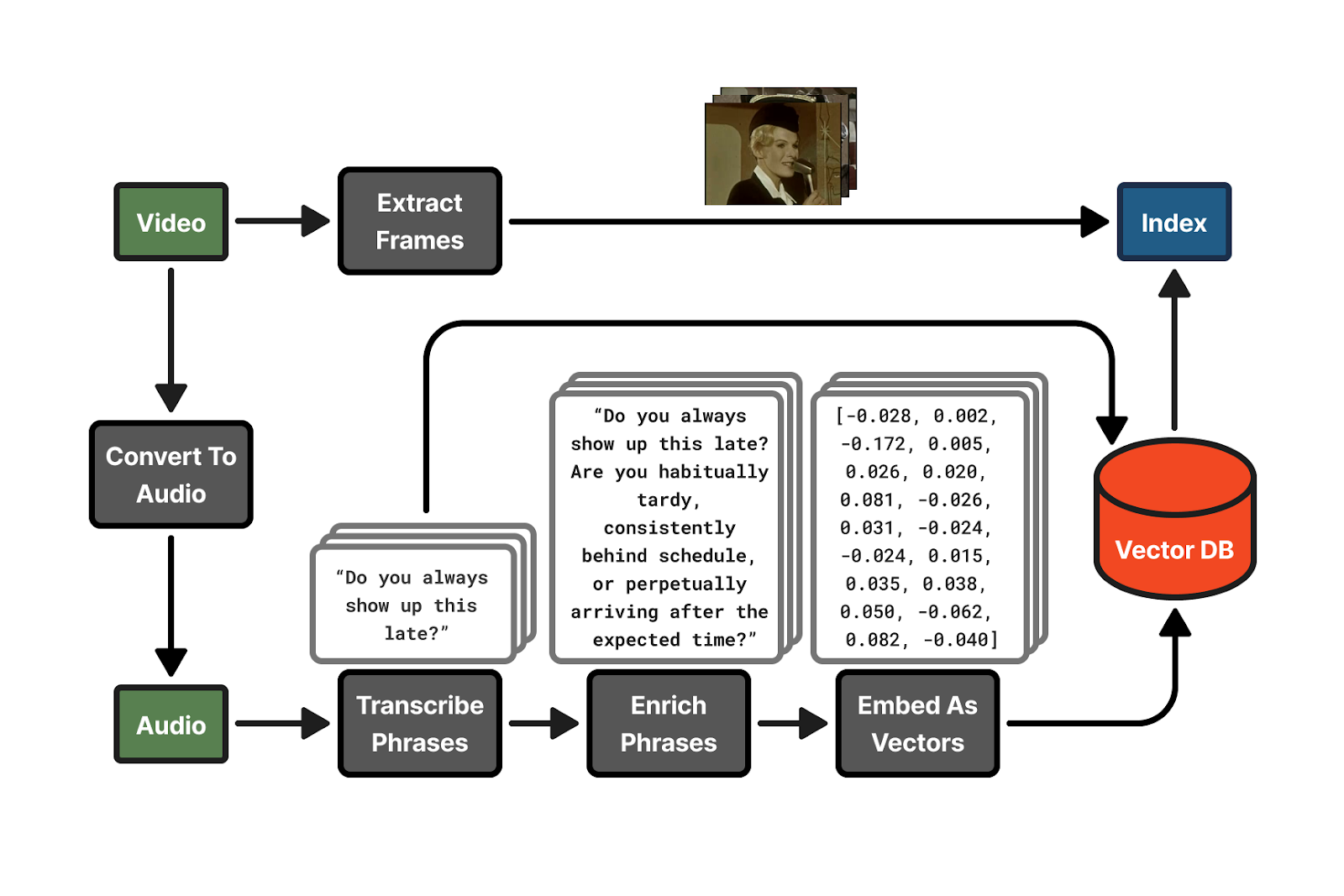
Sourcing videos
All the videos indexed on the RTT demo website came from the Internet Archive, except for the videos from a couple Youtube channels.
While processing videos one-by-one works (rtt process video1.mp4 video2.mp4), RTT has a batch mode that indexes multiple, remote video files simultaneously. One supported format is a JSON file containing metadata:
Which is run like so (--collection groups these videos together so it's easy to filter them in the rtt serve web UI):
I constructed several of these JSON files using this prompt with my coding agent:
rtt batch also supports sourcing videos from Youtube using the yt-dlp library, although Youtube will essentially block you after only a couple dozen downloads in an hour:
Transcribing videos
OpenAI's open source Whisper model) is the standard for transcribing audio to text. Run locally, RTT will download and use the model from faster-whisper to transcribe text, which is based on OpenAI's original model.
Enriching transcriptions
Enriching phrases pulls out implicit meaning in text and makes it explicit. This improves semantic search [0].
For example, the phrase "Can I come home today?" could be enriched to:
Or "Your absence is becoming conspicuous." could be enriched to:
RTT has no local alternative to enrichment besides skipping it with --no-enrich. This is because a lower quality LLM model is more likely to not pick up on implicit meaning and add noise to the transcription, rather than improve it. And that makes the semantic search worse.
I used the following prompt with Anthropic's claude-sonnet-4-5-20250929:
The [context] is the video title and/or description, if it's available (see "Sourcing videos" above) and [transcriptions] are the transcription chunks.
Enriching the transcriptions was the most expensive part of the project. I opted not to use enrichment for the significant majority of the videos indexed on the demonstration website, which dropped the cost of processing videos to nothing.
Embedding
I used ollama to run the nomic-embed-text model to turn the enriched transcription chunks (or unenriched, when skipping enrichment) into embeddings. Recall from Turning text into coordinates above that an embedding is a list of decimal numbers that's like a coordinate in a space of meaning.
In the index, I could store this as JSON text or a simple binary data format. But there are already standard, more efficient ways of storing vector databases (a group of vectors).
I used the Parquet columnar format with the PyArrow library. Parquet is more efficient than JSON or a simple binary format because the embeddings from ollama are all normalized between -1 and 1 and one of Parquet's strengths is compressing values that are similar.
Extracting frames
FFmpeg is a standard tool for transforming and converting video and audio files. I used it to extract a frame from the video at the beginning of each transcription chunk to visualize it in the search.
FFmpeg also supports pulling frames out of videos at a remote URL. This allowed me to avoid downloading any of the videos during the pipelining with rtt batch. Each frame was pulled directly from the Internet Archive with a simple web request by FFmpeg.
In the future, I would like to also use an image model like SigLIP-2 [1] to turn each frame into embeddings compatible with the text ones. Having this additional context for each transcription chunk might improve search, as so much of the content in a video is seen and not spoken.
Creating the index file
Each video index file is a zip file, but with the .rtt extension. It contains a JSON file (the transcripts), a vector database (the embeddings), and the frame images.
Combining many indices for semantic search
The rtt serve component of RTT reads all the semantic indices from one or more files or directories and combines them together into memory for searching them in the web interface (the frames are decompressed and loaded as needed from the .rtt files).
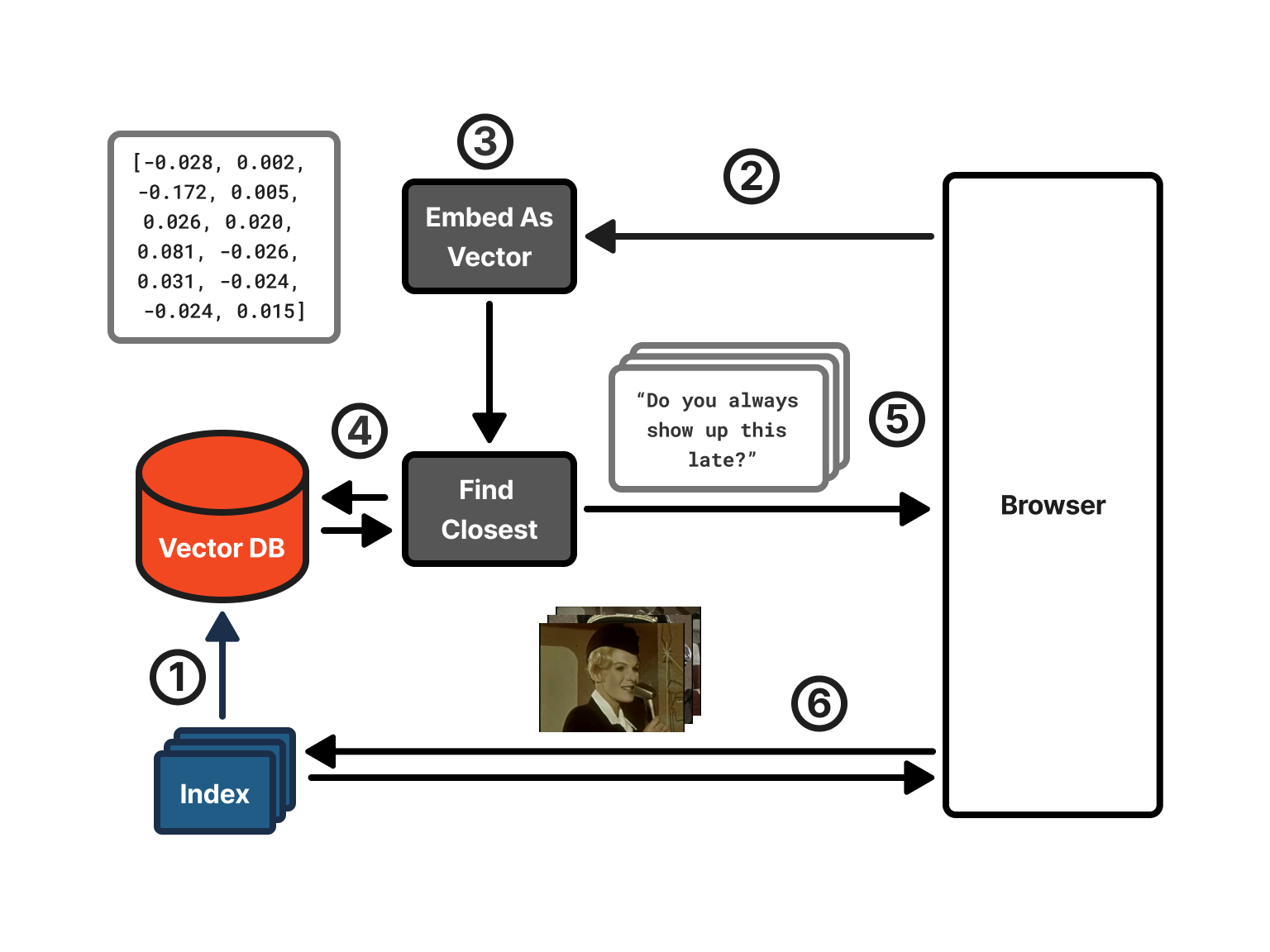
The search works in this way:
- The RTT web server loads all the transcriptions and embeddings. It puts the embeddings into a vector database for quick searching (i.e. puts them all in a list 😝).
- The user searches through the web interface.
- Using ollama, RTT converts the search terms into an embedding.
- RTT uses the search term embedding to find the embeddings in the vector database that are closest (see cosine similarity below)
- It sends the corresponding transcriptions, video IDs, and filenames of the frames to show to the browser.
- The browser creates HTML elements pointing to the frame image files and it loads them from the RTT web server as static assets.
Intuition for measuring the distance between two vectors (cosine similarity)
In video games, a common way to detect if two players/NPCs are facing each other is to check if the dot product of the directions they're facing is negative (). The reason this works is because the dot product will be around 1 if they are facing in a similar direction and around -1 if they are facing opposite directions (assuming each vector has length 1):
The dot product of two 2D vectors (Freya Holmér)
Cosine similarity () normalizes the dot product by the vectors' magnitudes, keeping the result between -1 and 1 (we need to divide because the vectors are not necessarily of length 1). The main difference between using it for games compared with semantic search is that while in games you'll only have two or three dimensions, each vector in our semantic search has 768 dimensions.
If two vectors are facing the same direction, then they are similar. This is what we use to compare how similar the embeddings are.
Increasing throughput with the theory of constraints
RTT can index all the video files locally, but the GPU, file storage, and Internet speed quickly become bottlenecks.
Indexing videos with RTT is a pipeline (transcribe, enrich, embed, create index). If you have a pipeline, where several processes in a row depend on the previous, then the theory of constraints tells us that the entire pipeline will only go as fast as its slowest component. Identifying and reducing the bottleneck increases the throughput of the entire system.
Parallelizing transcription
At the start, the bottleneck was the transcribing process (faster-whisper). I'd run FFmpeg locally on my system to convert files directly into audio files and then pass them to the transcription model. My GPU transcribed videos slowly though.
To parallelize the transcribing of remote videos, I used a paid third party service called Assembly AI. Due to sheer luck, they had a promotion that gave new users 5,000 hours of free transcription with their new model. So I was able to transcribe several large collections of videos, 200 videos in parallel at a time, for free.
It was advantageous not only because I could run transcriptions in parallel, but also because Assembly AI pulled the video and transcribed it directly, so I didn't even need to download the videos anymore, just the transcription text from AssemblyAI.
After each video was transcribed, pulling down the transcription was very fast, since it was just text.
Tracking indexing progress to avoid redoing work
Now that I was paying for remote services, I didn't want to have to recompute parts of the pipeline if indexing a video failed at a later stage. I started tracking the state of indexing each video in a separate JSON file so I could stop and resume it at the most recent phase it finished.
When working with YouTube videos, this was helpful too. I couldn't pass the YouTube video links directly to Assembly AI to transcribe, so I'd first download the audio version of the YouTube video and upload to Assembly AI, delete it, and only then download a lower resolution version of the video. Prioritizing finishing indexing videos in later phases of the pipeline meant that my harddrive would only contain a small number of YouTube videos at once.
This also fit with my wish to make RTT more like a command line tool that one could run on their own files. Keeping the JSON file to track processing and then the index itself with the video file fit how I imagined a good standard tool would work.
The JSON files meant I didn't have to keep a database when batch indexing videos. However, when parallelizing multiple parts of a pipeline, one doesn't simply throw N threads at it to make it go faster.
Scheduling with threads as the bottleneck
At first, I prioritized finishing indexing videos in later stages before starting new ones. This way, I was able to more quickly test how well the semantic search was working over more videos and make fixes to the tool sooner.
Afterwards, I further segmented the batch processing to give each phase its own set of threads as I realized some phases needed more parallelism than others. The goal is to saturate each capability with work until you hit the next bottleneck.
I tracked how many videos were waiting to do each phase of the pipeline. I also logged how long they took to complete each phase by marking the time when they entered that phase and subtracting it from the current time when they finished. This helped determine what the bottleneck was (below, 129 videos were waiting for their frames to be extracted):
So I'd notice that the queue for a specific phase had a lot of items in it and each one was waiting in the queue a long time.
Reducing network traffic with FFmpeg and audio-only
Discovering that FFmpeg could extract frames without even downloading the video greatly accelerated how fast frames could be downloaded (see Extracting frames). Making 10-20 simultaneous web requests to the Internet Archive to pull down all the frames was much faster than downloading the entire video.
That being said, this approach was not always available. I indexed the videos in a couple YouTube channels for the demo website. I don't know YouTube's internal policy for blocking or not blocking connections to download videos, but I suspected that more connections was more likely to get me blocked, so I would continuously download videos–one at a time–to extract the frames instead of making many requests to different parts of the video.
Improving embedding speed
Initial calculations told me that I wouldn't need to outsource the embedding (turning enriched transcriptions into embeddings) to a third party. The volume of text my local ollama (nomic-embed-text) process could turn into embeddings was significantly higher than the other parts of the pipeline. However, watching how many items were in each queue suggested that my calculation had been wrong:
I would expect that there'd be close to zero videos waiting for their transcriptions to be turned into embeddings. To verify, I ran this command on my macOS to see how idle my GPU was in ten seconds of running the pipeline:
So 58% of the time, my GPU was doing nothing.
I researched and found that ollama could be run to accept more than one request at a time using OLLAMA_NUM_PARALLEL. The pipeline already batched all of a video's transcriptions into a single request, but it sent only one request at a time, so ollama processed videos sequentially even though its GPU had more capacity. After launching ollama with OLLAMA_NUM_PARALLEL=8, I noticed GPU usage rise to near 100% and the embed queue disappeared.
Reducing thrashing in the web search
The RTT web server had its own bottleneck: memory.
My original implementation used LanceDB, but with 112868 transcription chunks loaded over 4231 files, I decided to migrate to loading the Parquet data more directly with PyArrow. I replaced the embedding storage with numpy arrays at half precision (float32 to float16), halving the memory from ~300MB to 150MB. I also released each .rtt file's data immediately after loading it into the combined array, rather than keeping two copies in memory until all files were loaded.
While fixing the memory issues, I also noticed that after a single web search, the CPU usage was higher for a several minutes afterwards and the service became unusable.
I added a /debug/threads endpoint on the server that read each thread's CPU counters from /proc/self/task/*/stat. That told me how much time in application code vs. kernel work each thread was spending. The threads were spending almost all their time on kernel tasks. This aligns with the memory problem. When the memory is limited, the OS must page memory out to disk to make room for other memory allocations. Later, it pages the memory stored on disk back into memory as it's needed, which further occupies CPU.
You can hear more from me on YouTube or Twitter.
Footnotes
- [0] Chen, P. B., Wolfson, T., Cafarella, M., & Roth, D. (2025). EnrichIndex: Using LLMs to Enrich Retrieval Indices Offline. arXiv:2504.03598.
- [1] Tschannen, M., Gritsenko, A., Wang, X., Naeem, M. F., Alabdulmohsin, I., Parthasarathy, N., Evans, T., Beyer, L., Xia, Y., Mustafa, B., Hénaff, O., Harmsen, J., Steiner, A., & Zhai, X. (2025). SigLIP 2: Multilingual vision-language encoders with improved semantic understanding, localization, and dense features (arXiv:2502.14786). arXiv.